How to Push Key Poses in Character Animation
Learn how to push key poses using line of action, power centers, and shape contrast to turn standard acting choices into dynamic character animation.
Article by Richard Arroyo & iAnimate Team, 2026-09-25
To push key poses is the practice of exaggerating body mechanics, lines of action, and structural tension to elevate standard performance choices. Rooted in Disney master Eric Larson's 1983 teaching, pushed poses communicate internal character thoughts clearly through heightened visual statements.
Introduction
Are your animation key poses feeling flat, generic, or trite even when your reference video looks convincing? Do you find that your character's acting beats blend into standard body language instead of grabbing the audience's attention?
Posing for performance requires moving past raw reference copy-pasting to actively design visual statements. When you learn how to manipulate internal structure, power centers, and silhouette contrast, your performance transitions from plain motion capture copy to genuine entertainment.
In this guide, you will learn the step-by-step process of evaluating body mechanics, applying dynamic reversals, and isolating weight distribution to push key poses past everyday movement.
"In studio work across feature films like Stuart Little and Scooby-Doo, we adjusted rig flexibility based on design constraints, showing that pushing a key pose means exaggerating the idea while strictly respecting character design limits." — Angie Jones, Senior iAnimate Instructor
Visual Statements and Line of Action in Pushing Key Poses
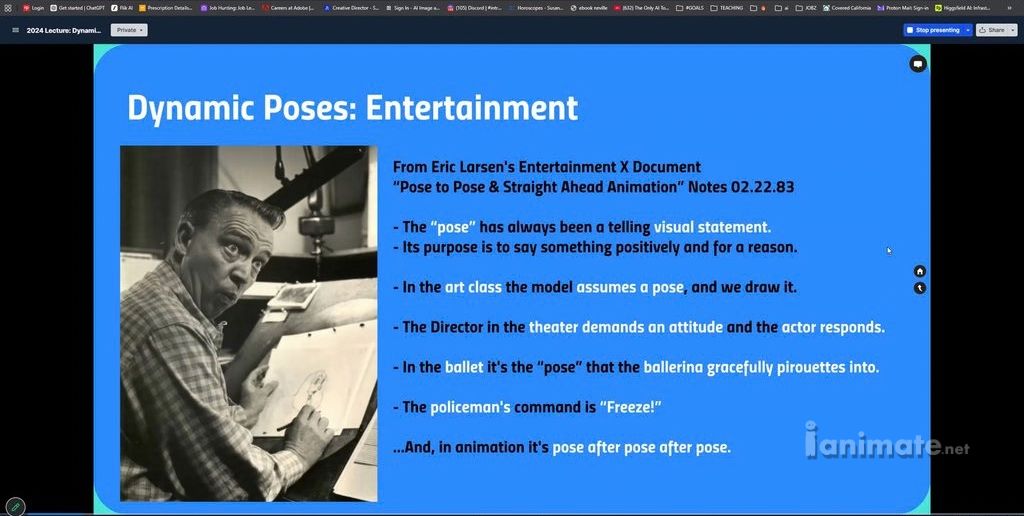
To push key poses requires transforming an ordinary structural pose into a clear visual statement that reveals character thought. Based on historical guidelines from Disney veteran Eric Larsen (1983), animation requires continuous keyframe posing where externals reflect internal emotion. Establishing a clear line of action ensures the pose communicates instantly to the viewer. (Source: iAnimate Feature Workshop 5, 2026)
In live-action, human movement is often subdued and subtle. In character animation, copying everyday reference directly results in passive keyframes that fail to convey clear emotion.
Pushing a key pose starts with identifying what your character thinks and feels at that exact beat. The mind acts as the pilot, and the physical body expresses those thoughts externally.
- Define the intent: Identify the single dominant emotion or thought driving the character beat before moving control handles.
- Establish clear posture: Avoid ambiguous torso positions by committing fully to an explicit vector or tilt.
- Strengthen line flow: Align the head, spine, and leg extensions along a singular, primary line of action.
- Eliminate neutral posture: Adjust foot placement and hand weight to remove default standing poses.
"Eric Larsen’s 1983 dynamic pose notes emphasize that every single pose in animation must create an external visual statement of what the character is feeling internally."
Respecting Character Rig Proportions and Design Limits
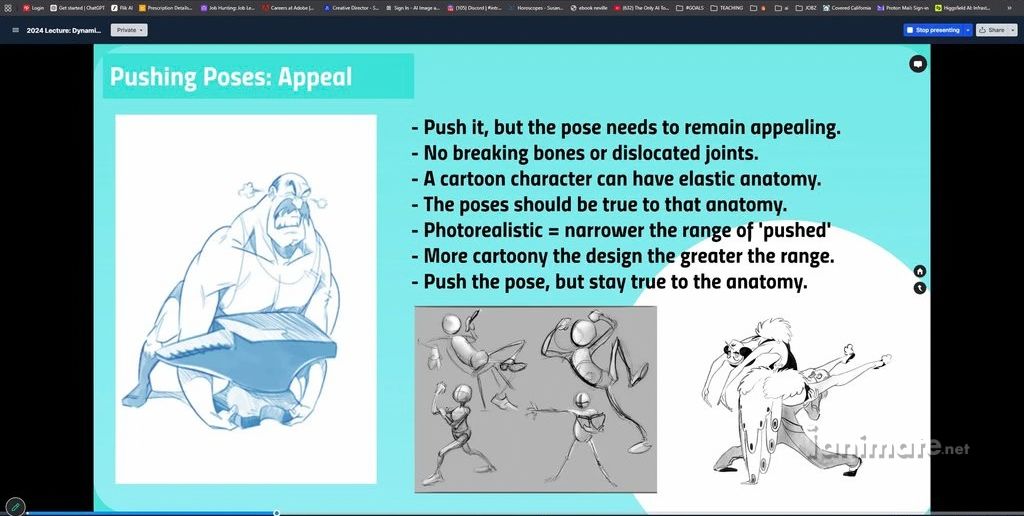
Character design limits dictate how far an animator can push body deformations without breaking the rig or style. Highly stylized rigs allow broad squash, stretch, and volume manipulation, while photorealistic characters require subtle internal weight placement to maintain structural realism. To push key poses means heightening the narrative idea, not destroying the model's anatomy.
Pushing key poses does not mean pulling rig joints out of their sockets indiscriminately. You must respect the character design while searching for opportunities to add dynamic flair.
Stylized characters afford immense leeway for internal squashing and extreme silhouette tweaks. Conversely, realistic creatures or hybrid live-action characters require you to push the acting through precise weight shifts rather than extreme geometry mesh tearing.
- Assess rig mechanics: Identify whether your character has flexible soft geometry like Maui from Moana or chiseled rigid features like Hiro from Big Hero 6.
- Preserve volumetric integrity: Flex joints and adjust control points without collapsing limbs or tearing shoulder anatomy.
- Fit the production style: Temper extreme cartoon poses when working on live-action integration shots to keep the performance grounded.
- Exaggerate intent over geometry: Push the character's internal decision-making and tension rather than relying solely on extreme rig stretching.
"On photorealistic VFX projects like Red Planet, animators broke standard robotic movement rules by giving the 'Amy' robot tiger-like movement mechanics, demonstrating how creative posing pushes design within realistic constraints."
Animation Tips from Angie Jones’ Feature Workshop 5
- Historical animation pose fundamentals taught at iAnimate originate from Eric Larsen's 1983 Disney training documentation on dynamic poses.
- Structural weight distribution relies on identifying rigid skeletal body parts, such as shoulder blades, hips, and cheekbones, where skin rests close to the bone.
- High-contrast dynamic body posture and non-verbal expansion cues mirror universal biological power behaviors documented in evolutionary psychology research by Amy Cuddy.
Source: iAnimate Feature Workshop 5, 2026
Applying the Wave Principle and Reversals for Dynamic Posture
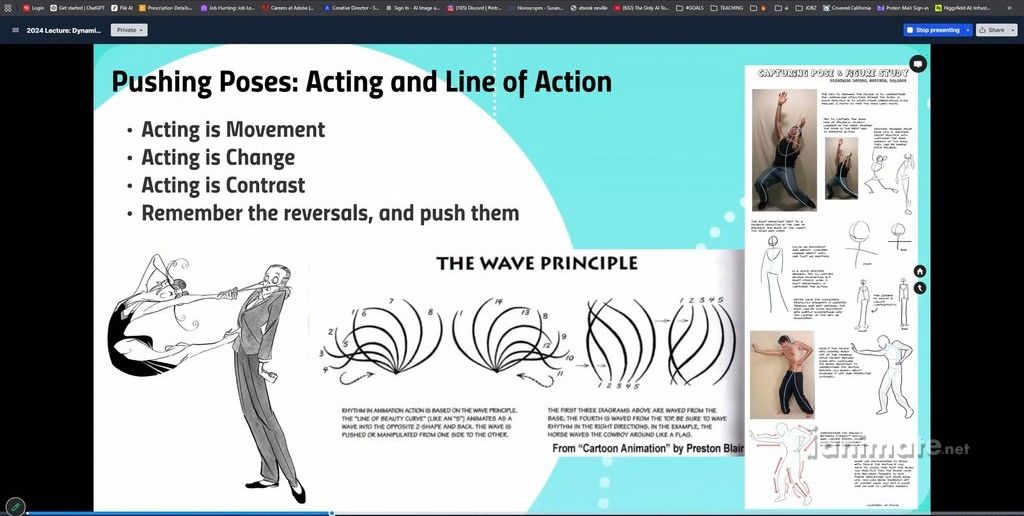
Reversals utilize the wave principle to transition character posture from one contrasting arc shape to another throughout a beat. By moving the spine from a positive C-shape curve to a reverse C-shape curve, animators generate natural tension and release. Incorporating subtle weight distribution shifts across hips and shoulders creates active, fluid transitions. (Source: iAnimate Feature Workshop, 2026)
A primary cause of static animation is keeping the character’s spine locked in one continuous curve across consecutive keyframes. To create dynamic flow, you must introduce posture reversals.
The wave principle dictates that energy travels through body joints sequentially. When a character moves from a wind-up into a primary action, alternating the spine's curve creates organic texture.
- Contrast keyframe curves: Transition the spine from an incoming concave C-shape arc into an outgoing convex reverse C-shape arc.
- Balance tension and release: Build up tight physical compression in anticipation poses before expanding into open release frames.
- Utilize blur shapes: Integrate stylized motion drag or extended shape silhouettes during fast broad transitions, similar to 2D traditional effects techniques.
- Shift hip balance: Alternate weight loading between the left and right hips to keep subtle standing beats dynamic.
"Effect animators like Ryan Woodward demonstrate how using dynamic blur shapes and explicit S-curves in framing heightens dramatic impact without sacrificing full physical control."
Deconstructing Key Poses: Power Centers, Wedges, and Negative Space
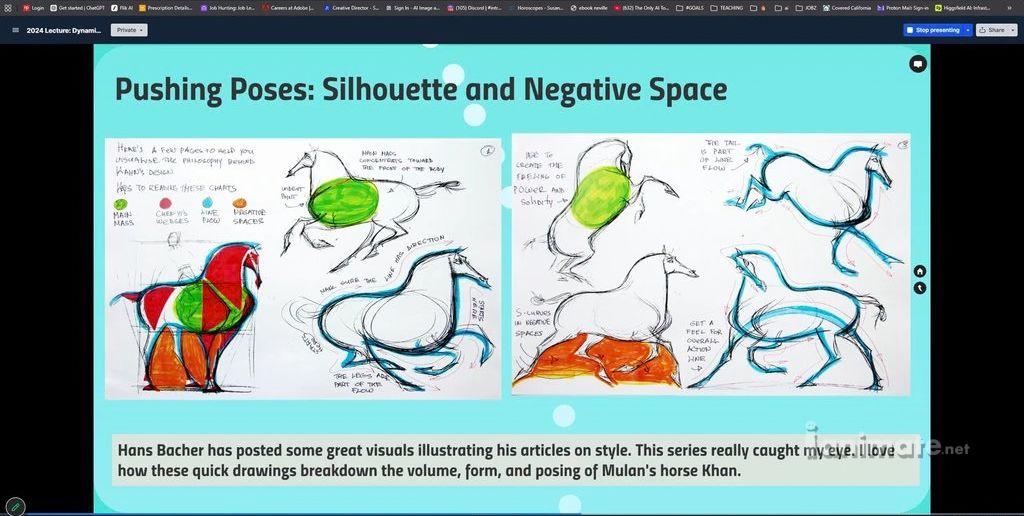
Power centers represent the internal focal mass from which a character's physical energy and motivation originate. Combined with rigid anatomical wedges (such as shoulders and hips) and clear negative space, animators establish readable silhouettes. Strategic contrast between straight lines supporting weight and curved relaxed limbs reinforces clear physical mechanics. (Source: Power Center, 2012)
To push a key pose systematically, break down the body into fundamental structural components: the main mass center, skeletal wedges, line flow, and negative space.
Every character relies on a designated power center. Older characters might carry their center low in the lower back to protect stiff joints, whereas confident superheroes lead primarily from the upper chest.
- Identify the main mass: Position the central chest or pelvis as the driver of balance and emotional authority.
- Respect skeletal wedges: Keep hard anatomical landmarks—such as shoulder blades, pelvic crests, and chins—stable to maintain clear structural anchor points.
- Isolate weight lines: Ensure every stance features a clear straight line along the supporting leg, balancing curved, unweighted limbs ("where there's weight, there's a straight").
- Clean up negative space: Clear the open areas between arms, torso, and legs to maximize silhouette readability from the main camera angle.
"Disney layout artist Hans Bacher mapped character breakdown poses by isolating the core power center, hard anatomical wedges, and open negative spaces to ensure instant visual clarity."
“I would do what I call ‘golden poses’ to build around a pose that communicates ‘the thing’ with a live action reference. There’s always way too much of it, and you have to go through and condense it down and pick out those important moments.” — (Glen Keane Interview Over the Moon)
How to Heighten Character Key Poses Using Reference Study
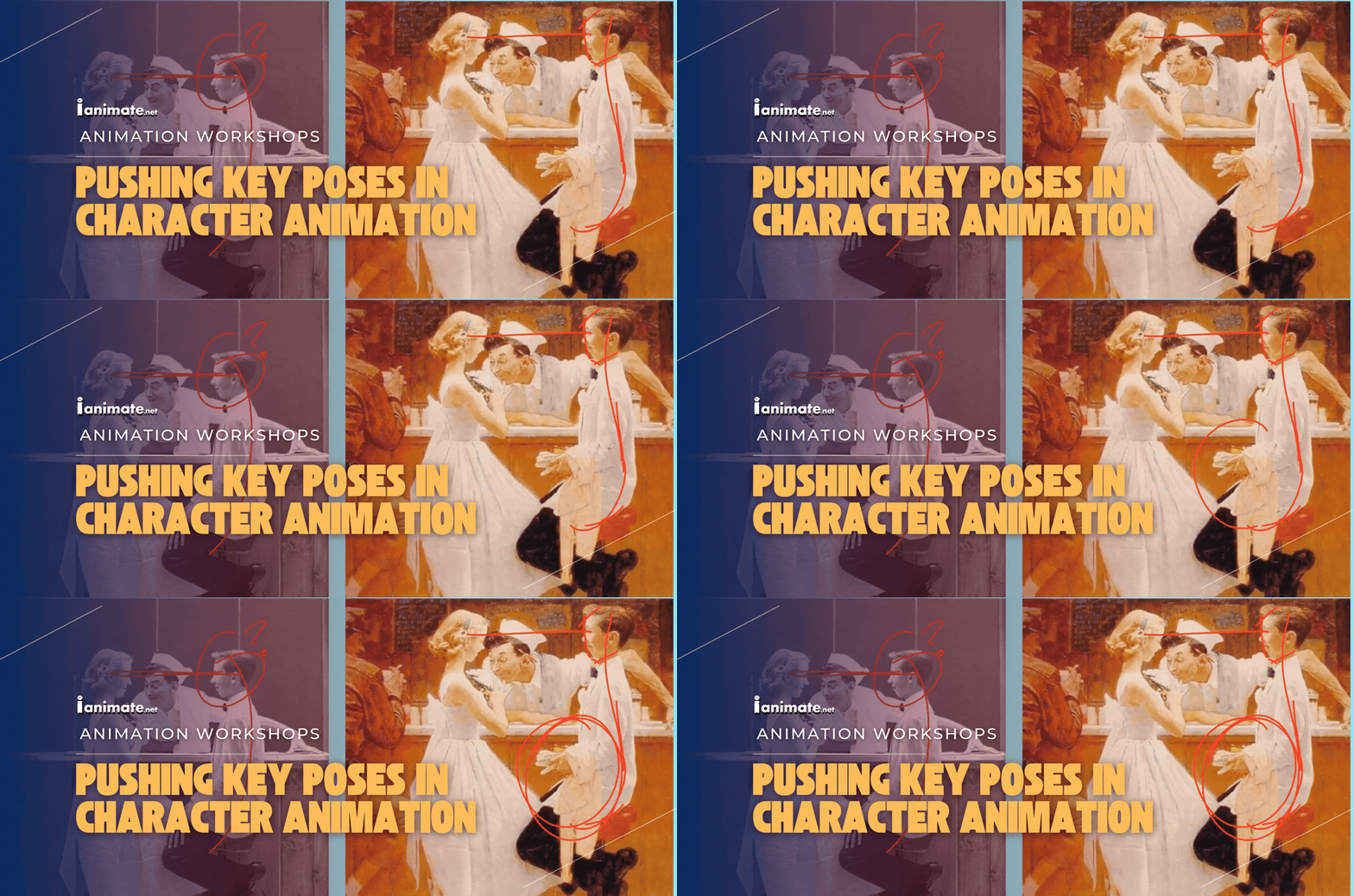
Reference plussing is the process of studying real-world video footage and heightening the mechanics, hand placements, and facial angles for performance art. As demonstrated in Norman Rockwell's editorial paintings, transferring real photos into memorable artistic poses requires adjusting camera layering, sharpening posture angles, and refining facial focus. (Source: Walt Disney’s Plussing, 2021)
Copying live-action reference frame-for-frame often introduces messy lines, obscured hands, and weak silhouette overlap. Professional animators use reference as a baseline, then plus the acting choices.
Illustrator Norman Rockwell routinely photographed live models before painting. He consistently modified foot angles, adjusted hand placements, and exaggerated facial expressions to enhance the storytelling beat.
Reference Plussing Workflow
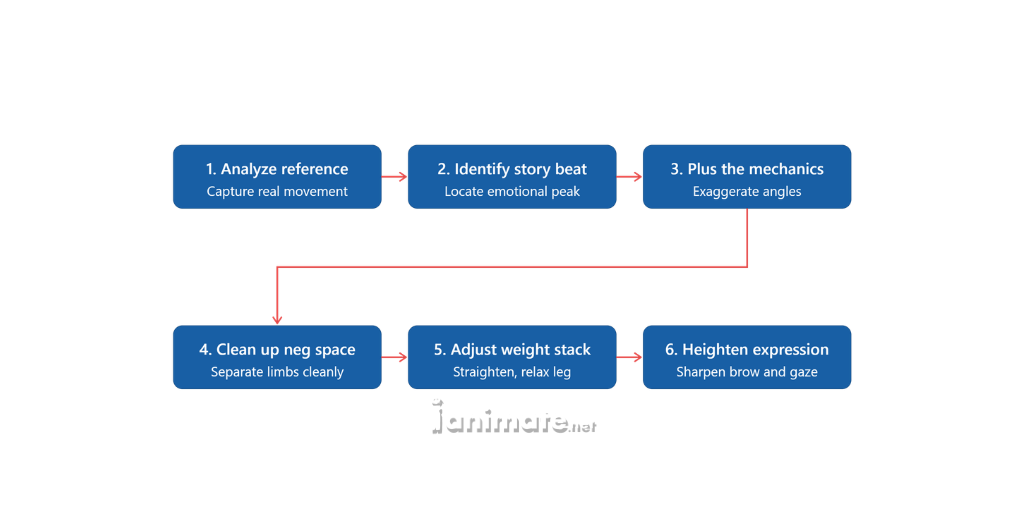
Step 1: Isolate the narrative beat: Determine the main emotional story point of the keyframe.
Step 2: Plus body angles: Sharpen hunched torsos, tilt head angles further, and expand arm extensions beyond raw footage.
Step 3: Layer depth in composition: Stagger arms and hands forward or backward relative to the chest to create depth layering instead of flat planar alignment.
Step 4: Sharpen eye gaze: Turn subtle side-eye glimpses into bold head twists with direct line-of-sight focal points.
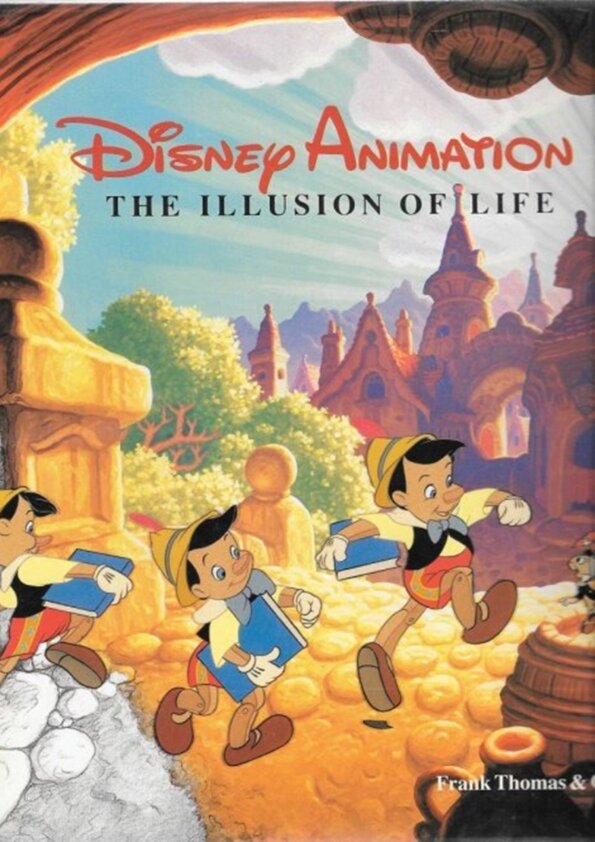
"The animator plans his action, figures out just which drawings will be needed to animate the business, makes the drawings, relating them to each other in size and action...” — Nine Old Men, Frank Thomas & Ollie Johnston, The Illusion of Life.
"I gained hands-on experience with industry-standard animation workflows and received direct feedback from top professionals.”
Mastering Dynamic Key Poses for Production
Pushing key poses is not about randomly over-extending limbs—it is about making deliberate, heightened storytelling choices. By analyzing power centers, balancing straight lines against curves, and designing clean silhouettes, you convert everyday reference footage into compelling character animation.
If your shots feel generic, step back and evaluate your keyframes in silhouette mode. Identify where you can sharpen line flow, apply dynamic reversals, and clarify your character's internal motivation.
Pushing your key poses elevates your keyframes from plain technical execution to highly entertaining studio-grade performance.
Bottom line: Dynamic key posing requires plussing real-world reference through clear lines of action, structural power centers, and strong silhouette contrast.
Frequently Asked Questions: How to Push Key Poses
What is pushing key poses in character animation?
Pushing poses is the technique of exaggerating a character's physical stance, line of action, and structural shape beyond raw human movement. Animators push poses to turn standard reference into clear, expressive performance art that communicates internal character thoughts instantly to the audience.
How do I push a key pose without breaking the character rig?
Respect the underlying character design and anatomical constraints. Flex limbs and adjust power centers to exaggerate the emotional beat while maintaining structural volume, keeping joints intact, and staying true to the established production style.
What is the line of action and why is it important?
The line of action is an imaginary line drawn through the main spine and direction of a pose. Establishing a strong, single line of action creates structural cohesion, directs the audience's eye, and ensures the pose conveys dramatic intent clearly.
What is the difference between a high-power and low-power pose?
As documented in body language studies, high-power poses expand the body outward, taking up space with open limbs and elevated chest positioning. Low-power poses compress inward, pulling limbs close, hunching shoulders, and minimizing spatial presence.
What does "where there's weight, there's a straight" mean?
This core mechanics principle means that any limb supporting body weight forms a firm straight line to demonstrate balance and gravity. Unweighted or relaxed limbs simultaneously create contrasting curved lines, adding clear weight distribution to the keyframe.
Written by iAnimate from Angie Jones' Feature Workshop
Angie Jones is a Global VFX Supervisor at Nickelodeon and Paramount Animation and an award-winning Animation Director with 30 years of experience across film, games, and cinematics. With credits including Pan’s Labyrinth, Stuart Little 2, Avatar: The Way of Water, Valorant, and Fortnite, Angie has been an iAnimate instructor since 2011, sharing her expertise in performance, storytelling, and animation with the next generation of artists.
Want to learn animation with Angie? Apply to Feature Workshop now and start your journey.
See how Angie Jones' students transformed in her Feature Animation Workshop:
iAnimate instructors are veteran feature film and game animators with decades of studio experience at top production houses worldwide. Drawing on classical principles and modern rigging workflows, they train upcoming artists to master advanced character performance.
Is This for You?
This post is for you if:
- Your character animation key poses feel flat, stiff, or overly copied from live-action video reference.
- You struggle to create clear silhouettes and dynamic weight distribution across complex performance beats.
- You want a repeatable studio workflow to push acting choices without breaking character rig mechanics.
Key Takeaway
Pushing key poses is the practice of exaggerating body mechanics, lines of action, and structural tension to elevate standard performance choices into clear, highly entertaining visual statements.
About the Author
Richard Arroyo is a Creative Director and Content Director at Ubisoft Montreal, as well as a Partner and Manager at iAnimate, with a career spanning feature film, animation, television, and video games since 1999. He has directed major titles including Skull & Bones, Watch Dogs Legion, and Rainbow Six Siege, and has helped shape iAnimate’s Games, Creature, Motion Capture, Rigging, and Pre-Visualization programs.